ACC Extrinsic Calls Reference
I. Introduction
This document is the operational reference for Community Council members executing governance and treasury extrinsic calls on Astar Network. It covers five core areas: claiming Community Treasury rewards, executing Community Treasury staking operations, managing dApp Staking listings, and approving treasury spending proposals. Each section is structured around the two primary interfaces available for these operations: Polkadot.js Apps and SubSquare.
This guide is intended to serve as the primary reference point for ACC members or any authorized member performing operations on behalf of the Community Treasury and its resources.
I. ACC and Community Treasury: Key Distinction
Understanding the distinction between the Astar Community Council (ACC) and the Community Treasury is essential for selecting the correct extrinsic and determining which prerequisites must be met before execution.
| Entity | Description |
|---|---|
| Astar Community Council (ACC) | A 6-member governance body (2 Core Team + 2 Astar Ambassadors + 2 Community Representatives) responsible for managing the Community Treasury and approving and rejecting dApps for dApp Staking. |
| Community Treasury | An onchain fund managed by the ACC, dedicated to community-related expenditures such as ambassador compensation, community events, and staking operations. Address: YQnbw3oWxBju7z5CRVoq1K6JzwDaj6DNePwdc2R2fG7jdix |
II. Pre-Operation Checklist: When to Claim Rewards First
Before executing any operation that involves moving or repositioning stake held by the Community Treasury, including staking, unstaking, and moving stake, all pending Staker Rewards must be claimed first. Failure to do so will result in failed transactions.
During the annual voting period re-staking, both Staker Rewards and dApp Owner Rewards must be fully claimed before any staking operation is executed.
| Operation | Staker Rewards | dApp Owner Rewards |
|---|---|---|
| Stake from Community Treasury | ✅ Required | Recommended |
| Unstake from Community Treasury | ✅ Required | Recommended |
| Move stake between dApps | ✅ Required | Recommended |
| Annual voting period re-staking | ✅ Required | ✅ Required |
| Register (list) a dApp in dApp Staking | ❌ Not required | ❌ Not required |
| Unregister (delist) a dApp from dApp Staking | ❌ Not required | ❌ Not required |
| Approve or reject treasury spending proposals | ❌ Not required | ❌ Not required |
II. Claiming Community Treasury Rewards
The Community Treasury participates in dApp Staking both as a staker and as a registered dApp, generating two distinct categories of rewards:
- Staker Rewards: Regular staking rewards accrued from ASTR staked in dApps via dApp Staking.
- dApp Owner Rewards: Rewards earned by the Community Treasury as a registered dApp owner in dApp Staking.
Each category follows a different claiming process, described in the sections below.
Via Polkadot.js
The Polkadot.js path allows any funded account to claim rewards on behalf of the Community Treasury without requiring a council motion.
Prerequisites:
- Access to Polkadot.js Apps
- Any funded Substrate account to cover gas fees
1.1. Staker Rewards
Community Treasury address:
YQnbw3oWxBju7z5CRVoq1K6JzwDaj6DNePwdc2R2fG7jdix
Anyone can claim staking rewards on behalf of another account. Each single extrinsic call claims up to 16 eras of rewards (~16 days). When the pending reward period spans multiple era pages, batch calls are required. Refer to Section II.I.1.2 for guidance on calculating how many calls are needed.
Scenario A: Claiming ≤16 pending eras
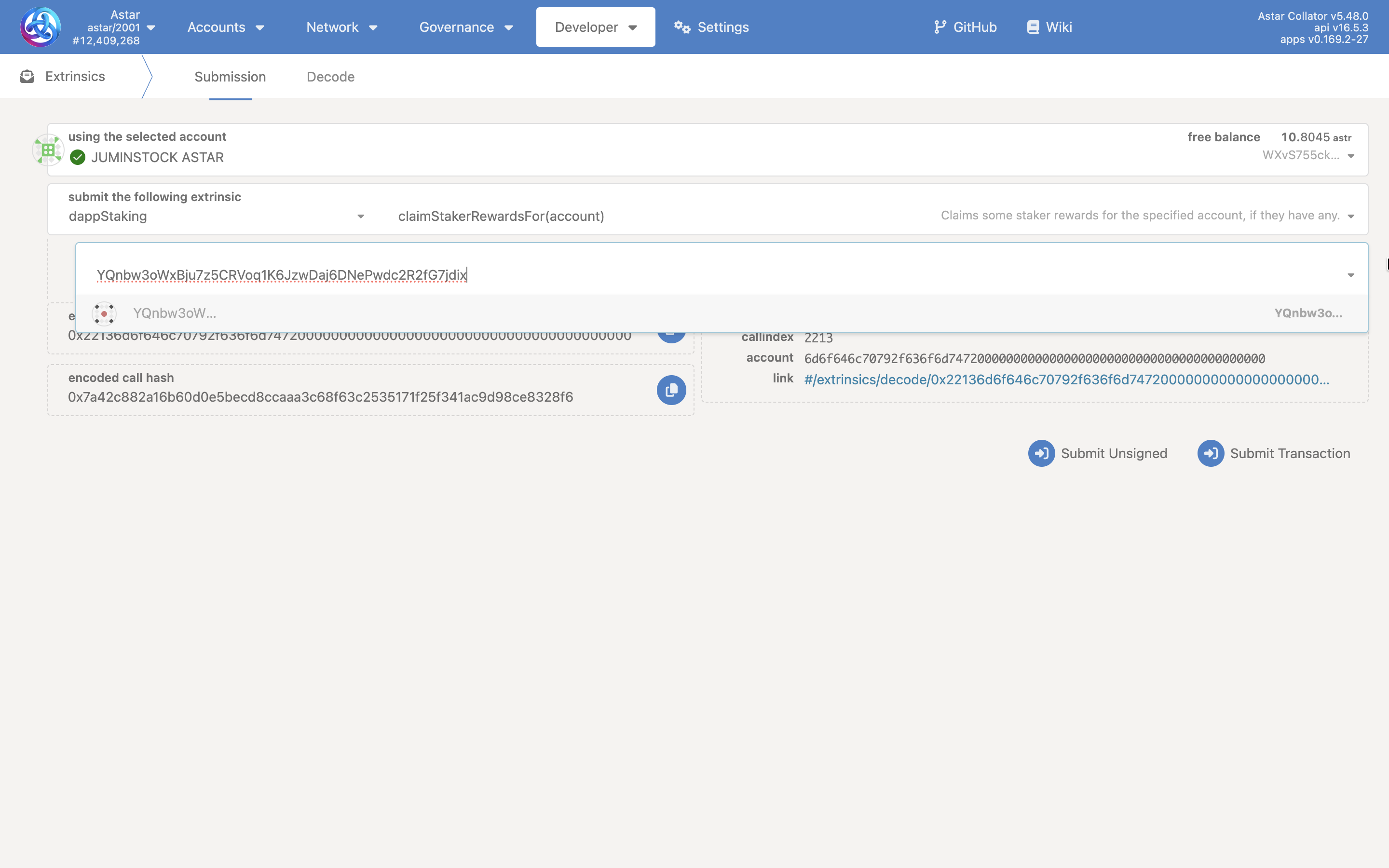
- Navigate to Polkadot.js Apps → Developer → Extrinsics.
- Select the
dappStakingpallet and theclaimStakerRewardsForcall. - Enter the Community Treasury address as the
accountparameter. - Sign and submit the transaction.
- Save and share the transaction hash in the ACC Telegram group.
Extrinsic call:
dappStaking.claimStakerRewardsFor(YQnbw3oWxBju7z5CRVoq1K6JzwDaj6DNePwdc2R2fG7jdix)
Encoded call data:
0x22136d6f646c70792f636f6d74720000000000000000000000000000000000000000
Scenario B: Claiming >16 pending eras (Batch Call)
When pending rewards span multiple era pages, wrap multiple claimStakerRewardsFor calls inside a utility.batch.
- Navigate to Polkadot.js Apps → Developer → Extrinsics.
- Select the
utilitypallet and thebatchcall. - Add the first
dappStaking → claimStakerRewardsForcall, entering the Community Treasury address. - Click "+" to add additional calls as needed, one per era page boundary crossed.
- Sign and submit the transaction.
- Save and share the transaction hash in the ACC Telegram group.
Extrinsic call:
utility.batch(calls)
├── dappStaking.claimStakerRewardsFor(YQnbw3oWxBju7z5CRVoq1K6JzwDaj6DNePwdc2R2fG7jdix)
└── dappStaking.claimStakerRewardsFor(YQnbw3oWxBju7z5CRVoq1K6JzwDaj6DNePwdc2R2fG7jdix)
Encoded call data (batch of 2 claims):
0x0b000822136d6f646c70792f636f6d7472000000000000000000000000000000000000000022136d6f646c70792f636f6d74720000000000000000000000000000000000000000
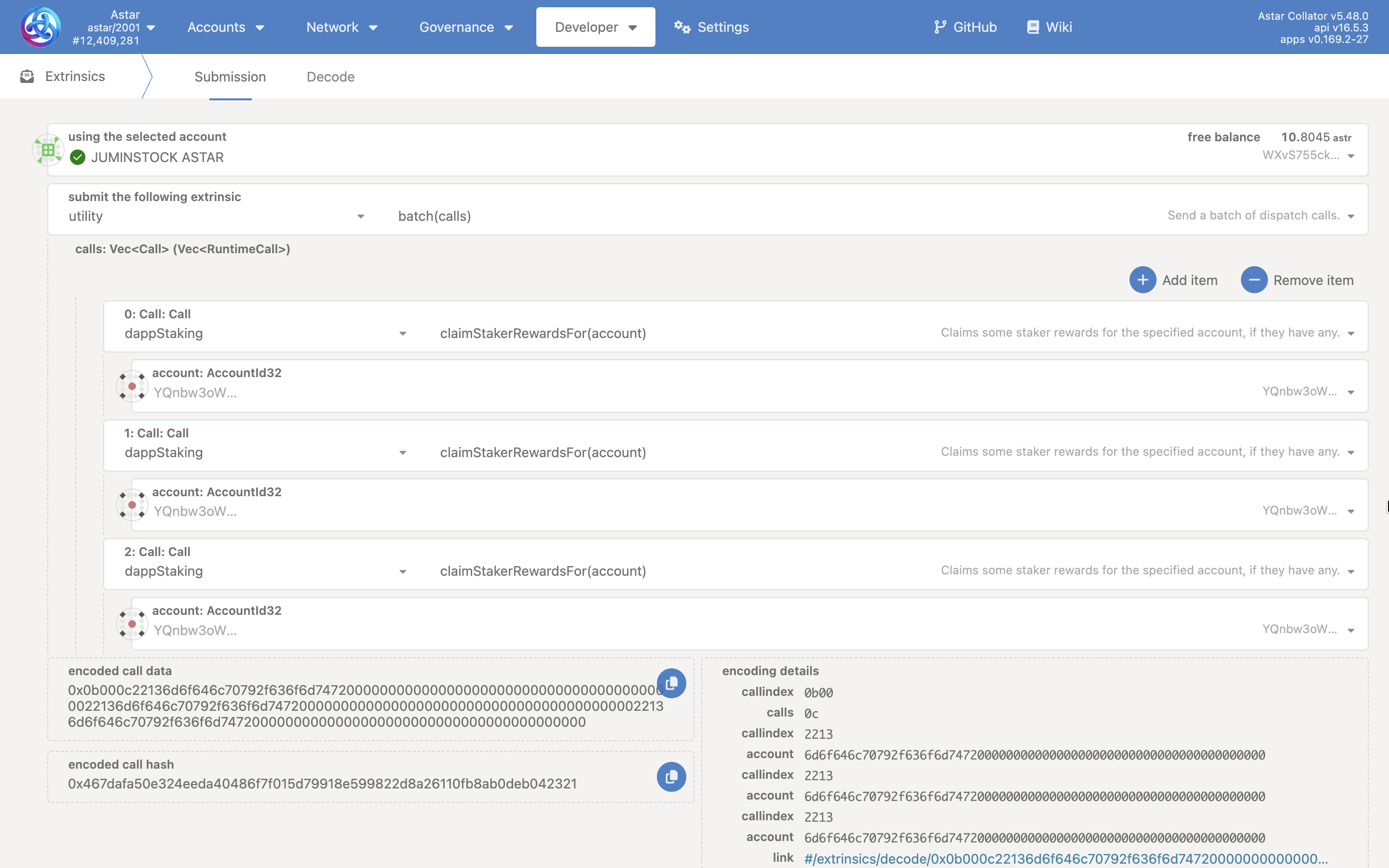
The number of claimStakerRewardsFor calls needed depends on how many era page boundaries have been crossed since the last successful claim. See Section II.I.1.2 for the formula and worked examples.
1.2. Understanding Era Pagination
This section explains why multiple claim calls may be required, how to determine the exact number needed, and how to verify reward status before executing any Community Treasury operation.
Eras and Pages
An era is the base time unit used by the dApp Staking protocol, roughly equivalent to one day. Staking reward data is stored onchain in pages of 16 eras, meaning each storage entry covers a fixed window:
| Page | Eras Covered |
|---|---|
| Page 1 | 1 — 16 |
| Page 2 | 17 — 32 |
| Page 3 | 33 — 48 |
| Page N | (N−1)×16+1 — N×16 |
Each dappStaking.claimStakerRewardsFor call can claim up to 16 eras, but only within a single page. If the pending era range crosses a page boundary, multiple calls are required even if fewer than 16 eras are pending in total.
Why Multiple Calls Are Sometimes Needed
Consider the following example:
- Current Era: 24
- Last Claimed Era: 15
- Pending Eras: 16 to 24 (9 eras total)
Era 16 belongs to Page 1, while eras 17–24 belong to Page 2. Even though only 9 eras are pending, two separate claimStakerRewardsFor calls are required because the range spans two different pages.
Calculating How Many Calls Are Needed
Use the following formula to determine which page an era belongs to:
page(era) = floor((era − 1) / 16) + 1
| Scenario | Current Era | Last Claimed Era | Pages Spanned | Calls Required |
|---|---|---|---|---|
| Same page | 20 | 12 | 1 | 1 |
| Two pages | 24 | 15 | 2 | 2 |
| Three pages | 50 | 30 | 3 | 3 |
As a general safeguard: always include one extra claimStakerRewardsFor call in your batch to handle edge cases at page boundaries.
Checking Pending Rewards via Chain State
Before submitting any treasury operation, verify the current claim status using Polkadot.js Chain State.
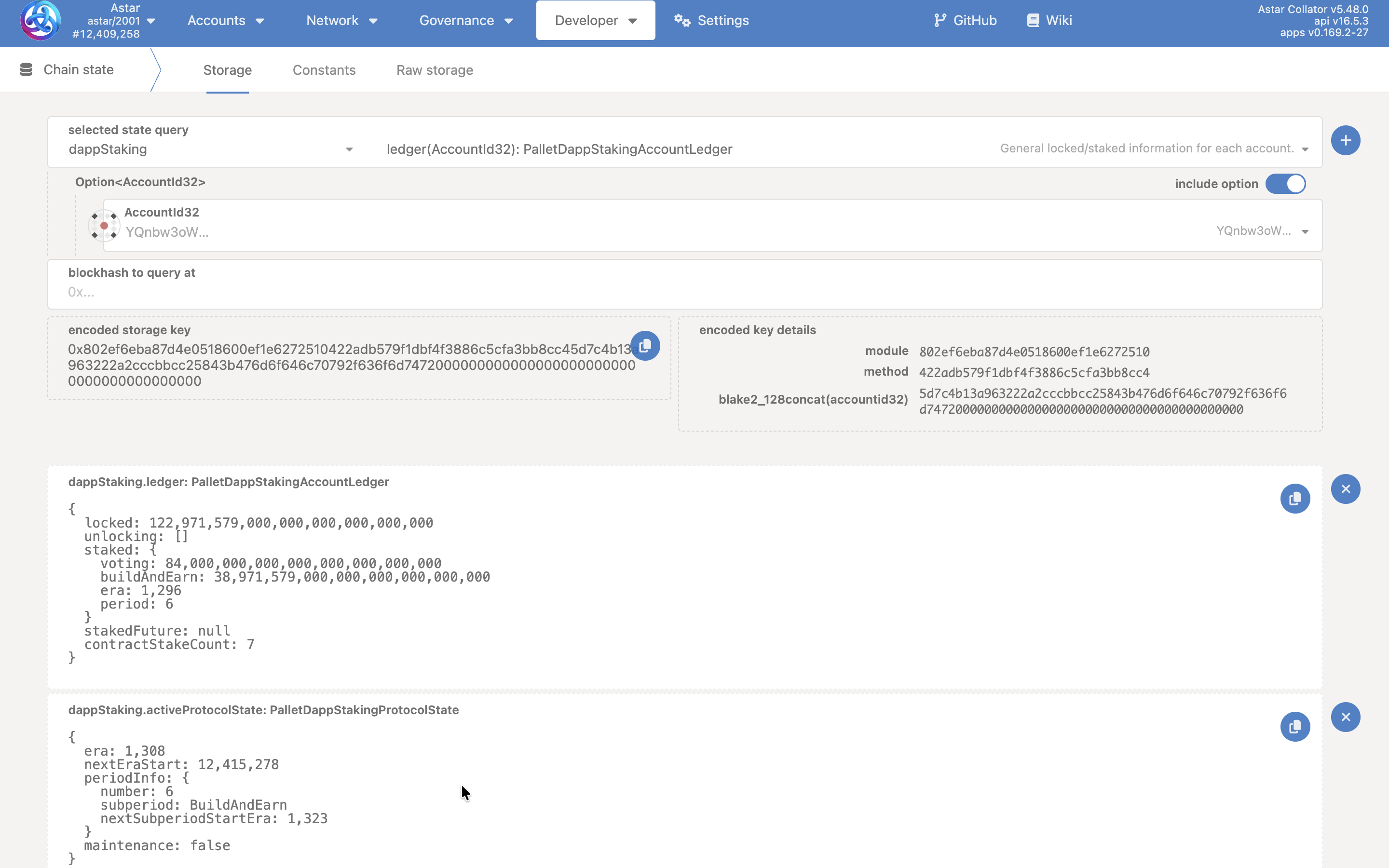
Step A: Check the current era:
- Navigate to Developer → Chain State.
- Select
dappStaking→activeProtocolState(). - Note the
eravalue, this is the current active era.
Step B: Check the last claimed era:
- Still under Chain State, select
dappStaking→stakerInfo(accountId, contractId). - Locate the
staked.erafield, this is the last era for which rewards were claimed for that account/contract pair. - If
currentEra > staked.era, there are unclaimed rewards pending.
Step C: Confirm after claiming:
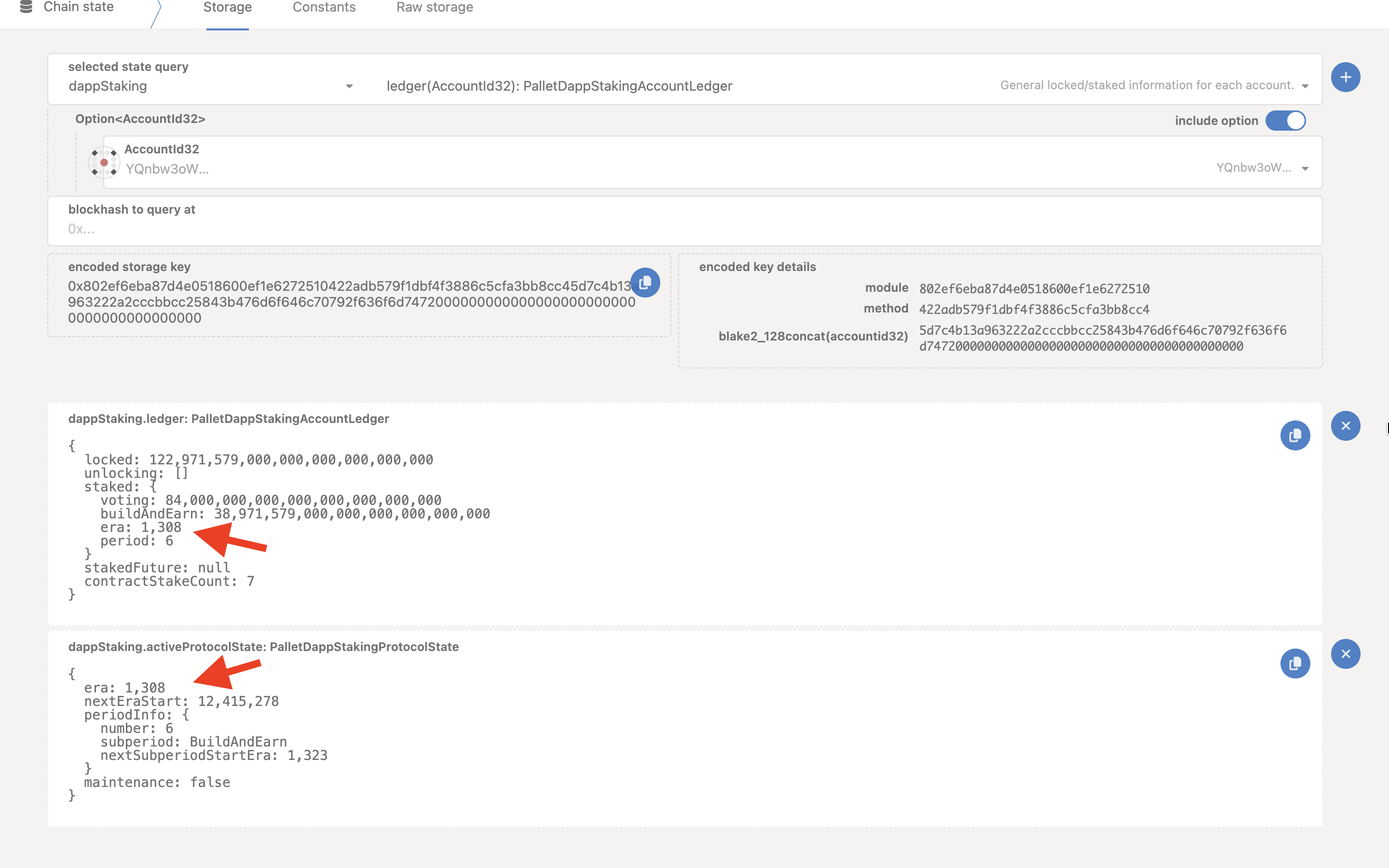
- Re-check
stakerInfo(account, contract)to confirmstaked.erahas been updated to the current era. - On Astar Subscan, review the extrinsic events and look for a
StakerRewardsClaimedevent confirming the eras covered.
Before executing stake, unstake, or moveStake on behalf of the Community Treasury, always follow this sequence:
- Check the current era via
dappStaking.activeProtocolState(). - Check the last claimed era via
dappStaking.stakerInfo(account, contract). - If
currentEra > staked.era, submit the requiredclaimStakerRewardsForcalls. - Include an extra claim call in the batch to safely cover any partial pages at the boundary.
Example batch pattern combining claims with a subsequent treasury operation:
utility.batch([
  dappStaking.claimStakerRewardsFor(treasuryAddress),
  dappStaking.claimStakerRewardsFor(treasuryAddress),  // extra for safety
  collectiveProxy.executeCall(
    dappStaking.moveStake({ Evm: fromContract }, { Evm: toContract }, amount)
  )
])
1.3. dApp Owner Rewards
The Community Treasury is registered as a dApp in dApp Staking and earns dApp Owner Rewards for eras in which it appeared in the tier rankings. These are claimed per era using the Community Treasury's contract address.
Community Treasury contract address:
0x101b453a02f961b4e3f0526ecd4c533c3a80d795
dApp Owner Rewards can be claimed by any funded account, council membership is not required. The transaction only needs sufficient ASTR for gas fees.
Step 1: Identify claimable eras
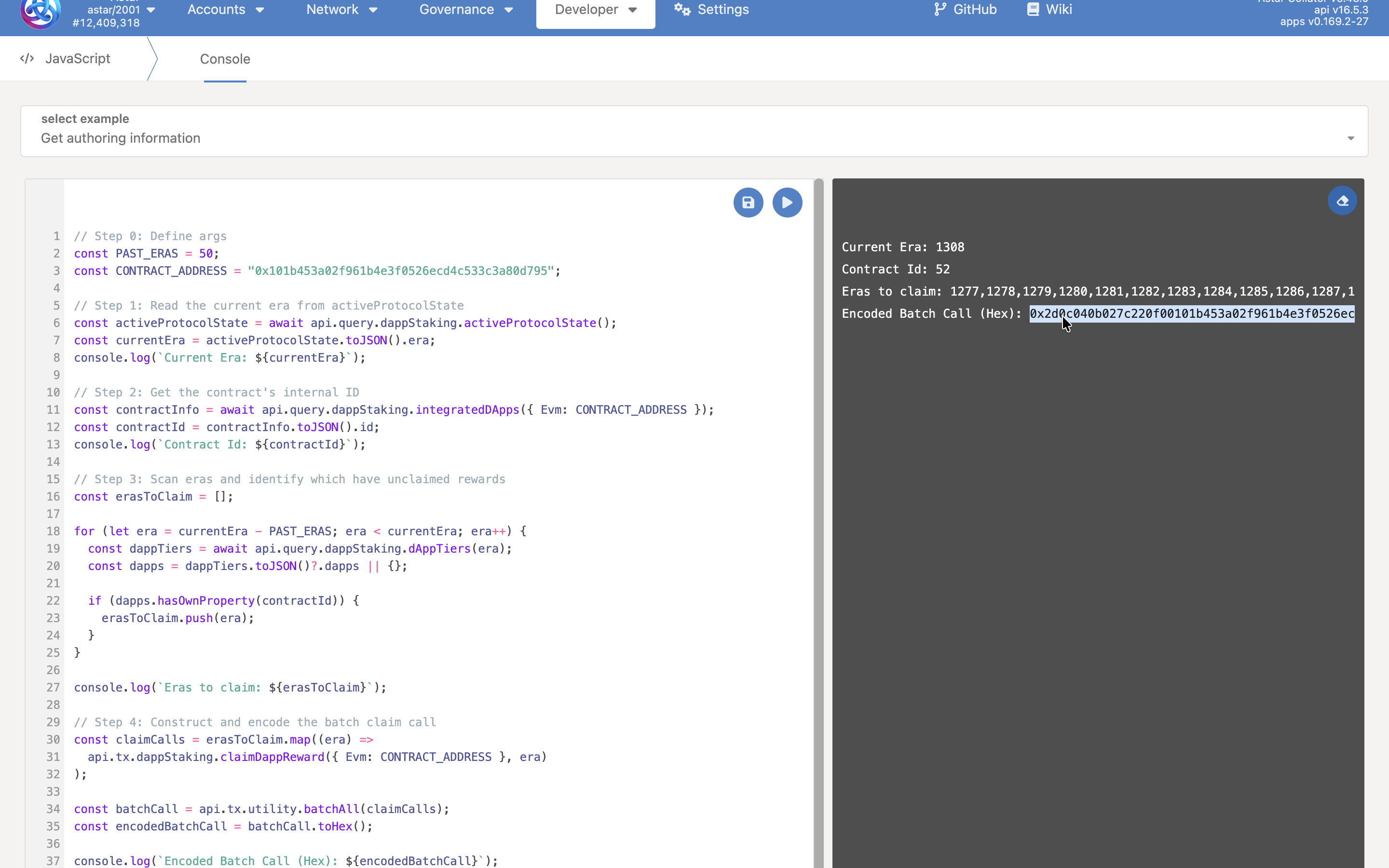
Navigate to the Polkadot.js Developer Console and run the script below. It scans the last 50 eras, identifies which have unclaimed dApp Owner Rewards, and outputs an encoded batch call ready for submission.
// Step 0: Define args
const PAST_ERAS = 50;
const CONTRACT_ADDRESS = "0x101b453a02f961b4e3f0526ecd4c533c3a80d795";

// Step 1: Read the current era from activeProtocolState
const activeProtocolState = await api.query.dappStaking.activeProtocolState();
const currentEra = activeProtocolState.toJSON().era;
console.log(`Current Era: ${currentEra}`);

// Step 2: Get the contract's internal ID
const contractInfo = await api.query.dappStaking.integratedDApps({ Evm: CONTRACT_ADDRESS });
const contractId = contractInfo.toJSON().id;
console.log(`Contract Id: ${contractId}`);

// Step 3: Scan eras and identify which have unclaimed rewards
const erasToClaim = [];

for (let era = currentEra - PAST_ERAS; era < currentEra; era++) {
  const dappTiers = await api.query.dappStaking.dAppTiers(era);
  const dapps = dappTiers.toJSON()?.dapps || {};

  if (dapps.hasOwnProperty(contractId)) {
    erasToClaim.push(era);
  }
}

console.log(`Eras to claim: ${erasToClaim}`);

// Step 4: Construct and encode the batch claim call
const claimCalls = erasToClaim.map((era) =>
  api.tx.dappStaking.claimDappReward({ Evm: CONTRACT_ADDRESS }, era)
);

const batchCall = api.tx.utility.batchAll(claimCalls);
const encodedBatchCall = batchCall.toHex();

console.log(`Encoded Batch Call (Hex): ${encodedBatchCall}`);
The script outputs:
- The current era number.
- The contract's internal ID.
- A list of eras with unclaimed rewards.
- An encoded batch call (hex) ready for submission.
Step 2: Execute the claim
- Copy the
Encoded Batch Call (Hex)value from the console output. - Navigate to Polkadot.js Apps → Developer → Extrinsics → Decode.
- Paste the encoded hex and submit from any funded account.
- Save and share the transaction hash in the ACC Telegram group.
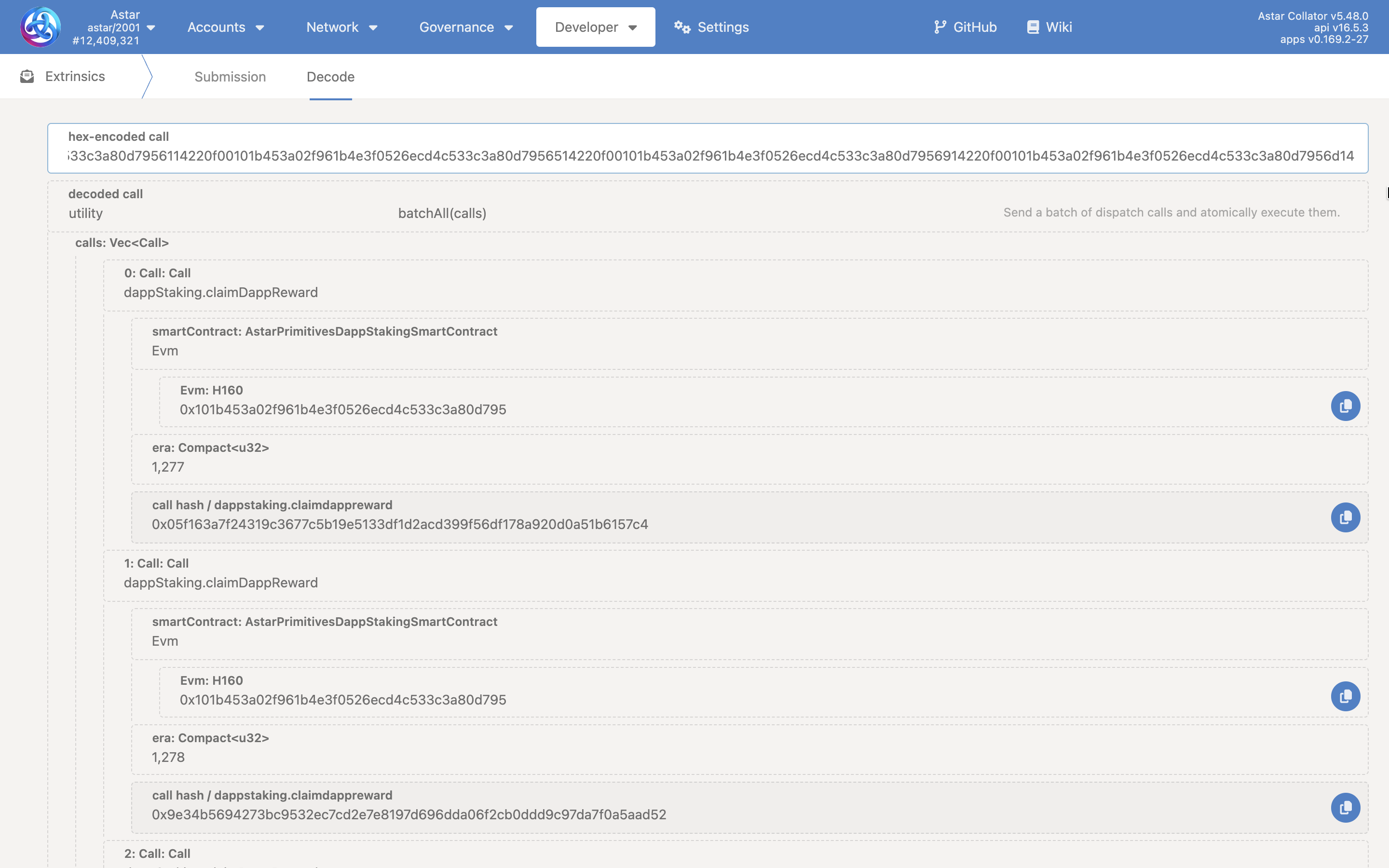
By default, the script scans the last 50 eras (~50 days). You can increase PAST_ERAS to cover a longer period — for example, setting it to 100 will scan the last 100 eras (~100 days).
Via SubSquare
The SubSquare path executes reward claims as a Community Council motion, providing formal onchain accountability and collective approval. Use this method when the ACC wants the claim to be recorded as a council action.
Prerequisites:
- Active ACC member account
- Access to SubSquare Community Council Motions
2.1. Staker Rewards
Scenario A: Claiming ≤16 pending eras
-
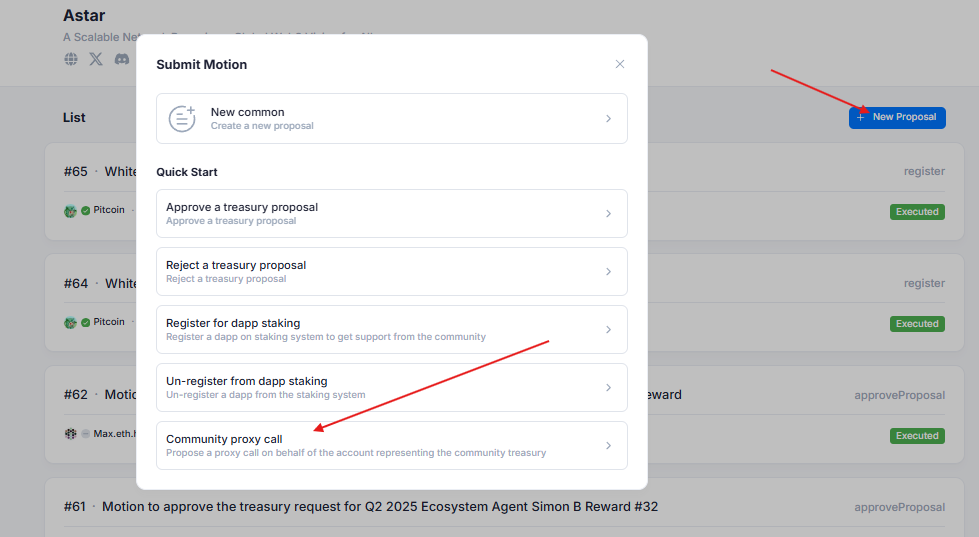
Navigate to SubSquare Community Council → Motions and click + New Proposal.
-
Select "Community Proxy call" from the Quick Start options.
-
Set the threshold to 2/3 of the current council size (e.g., 4 for a 6-member council).
-
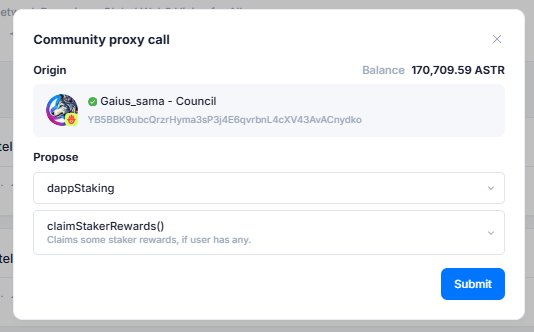
In the call builder, select
dappStaking→claimStakerRewards. -
Submit the motion.
Scenario B: Claiming >16 pending eras (Batch Motion)
- Follow steps 1–3 above.
- In the call builder, select
utility→batch. - Add multiple
dappStaking → claimStakerRewardscalls using "+ Add", one per era page boundary crossed. - Submit the motion.
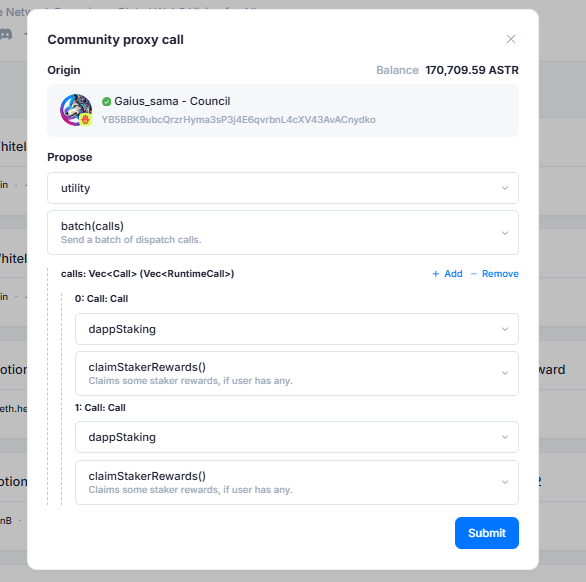
Motion lifecycle:
- The motion is published on SubSquare and visible to all council members.
- Members vote Aye or Nay within the designated voting period.
- Once the AYE threshold is reached, you can close the motion and the call executes automatically onchain.
- Save and share the transaction hash in the ACC Telegram group.
For the standard 2/3 majority requirement:
- 3-member council → threshold = 2
- 6-member council → threshold = 4
Always verify the current council composition before setting the threshold for any motion.
When executing operations that involve Community Treasury funds through a council motion, the call must be routed through collectiveProxy → executeCall to act on behalf of the treasury. The "Community Proxy call" Quick Start on SubSquare handles this automatically, do not bypass it.
III. Community Treasury Staking Operations
The ACC manages part of the Community Treasury's ASTR holdings through dApp Staking, staking on approved dApps to support the ecosystem while generating staking yield for the treasury. These are governance operations that the ACC can execute on behalf of the Community Treasury, and they include staking on newly approved dApps, unstaking when necessary, and moving stake between dApps when conditions change. During the annual voting period, the ACC must re-stake on all active positions to renew them for the new cycle.
Before executing any staking, unstaking, or stake-moving operation, all pending Staker Rewards must be claimed. During the annual voting period re-staking, both Staker Rewards and dApp Owner Rewards must be fully claimed before any staking transaction is submitted.
Follow the full claiming procedure in Section II before proceeding with any operation in this section.
Via Polkadot.js
The Polkadot.js path allows an authorized individual to construct and submit a council motion directly without using the SubSquare interface. All treasury staking operations must be routed through collectiveProxy → executeCall to act on behalf of the Community Treasury, wrapped inside a council proposal.
Prerequisites:
- Active ACC member account with council membership
- Access to Polkadot.js Apps
Base call structure for all treasury staking operations:
communityCouncil.propose(
  threshold,
  collectiveProxy.executeCall(
    dappStaking.<operation>(...)
  ),
  lengthBound
)
1.1. Stake on a dApp
- Navigate to Developer → Extrinsics.
- Select
communityCouncil→propose. - Set the
thresholdto 2/3 of the current council size. - Build the inner call:
collectiveProxy→executeCall→dappStaking→stake. - Enter the dApp's EVM contract address and the stake amount in ASTR (18 decimal places).
- Submit and sign the transaction.
- Save and share the transaction hash in the ACC Telegram group.
Extrinsic call:
communityCouncil.propose(
  threshold: 4,
  collectiveProxy.executeCall(
    dappStaking.stake({ Evm: "0xDappContractAddress" }, amount)
  )
)
1.2. Unstake from a dApp
- Navigate to Developer → Extrinsics.
- Select
communityCouncil→propose. - Set the
thresholdto 2/3 of the current council size. - Build the inner call:
collectiveProxy→executeCall→dappStaking→unstake. - Enter the dApp's EVM contract address and the amount to unstake.
- Submit and sign the transaction.
- Save and share the transaction hash in the ACC Telegram group.
Extrinsic call:
communityCouncil.propose(
  threshold: 4,
  collectiveProxy.executeCall(
    dappStaking.unstake({ Evm: "0xDappContractAddress" }, amount)
  )
)
1.3. Move Stake Between dApps
Use moveStake when repositioning stake from one dApp to another. Reward claiming calls can be batched alongside moveStake for efficiency.
All staker rewards must be claimed before executing moveStake. While claim calls can be included in the same batch, executing them separately is recommended:
Recommend:
utility.batch([
  dappStaking.claimStakerRewardsFor(treasuryAddress),
  dappStaking.claimStakerRewardsFor(treasuryAddress),  // extra for safety
])
collectiveProxy.executeCall(
  dappStaking.moveStake({ Evm: fromContract }, { Evm: toContract }, amount)
)
But this is valid as well:
utility.batch([
  dappStaking.claimStakerRewardsFor(treasuryAddress),
  dappStaking.claimStakerRewardsFor(treasuryAddress),  // extra for safety
  collectiveProxy.executeCall(
    dappStaking.moveStake({ Evm: fromContract }, { Evm: toContract }, amount)
  )
])
Standalone extrinsic call:
communityCouncil.propose(
  threshold: 4,
  collectiveProxy.executeCall(
    dappStaking.moveStake({ Evm: "0xFromContract" }, { Evm: "0xToContract" }, amount)
  )
)
1.4. Annual Voting Period Re-Staking
During the annual council voting period, all existing staking positions held by the Community Treasury must be renewed. This operation has stricter prerequisites than regular staking: both Staker Rewards and dApp Owner Rewards must be fully claimed before submitting any re-staking motion.
Required sequence:
- Claim all Staker Rewards: follow Section II.I.1.1.
- Claim all dApp Owner Rewards: follow Section II.I.1.3.
- Submit the re-staking council proposal, batching all active positions into a single motion:
communityCouncil.propose(
  threshold: 4,
  utility.batch([
    collectiveProxy.executeCall(dappStaking.stake({ Evm: "0xDapp1" }, amount1)),
    collectiveProxy.executeCall(dappStaking.stake({ Evm: "0xDapp2" }, amount2)),
    collectiveProxy.executeCall(dappStaking.stake({ Evm: "0xDapp3" }, amount3))
  ])
)
This section assumes that the Community Treasury has its tokens locked in dApp Staking. If not, you must first execute the dAppStaking.lock function.
Submitting all re-staking operations in one batched council motion minimizes the number of votes required from council members and reduces coordination overhead during the voting period.
Via SubSquare
The SubSquare path provides a guided interface for submitting treasury staking council motions without manual call construction. The "Community Proxy call" Quick Start option automatically wraps the inner call in collectiveProxy → executeCall.
Prerequisites:
- Active ACC member account
- Access to SubSquare Community Council Motions
2.1. Stake on a dApp
-
Navigate to SubSquare Community Council → Motions and click + New Proposal.
-
Select "Community Proxy call" from the Quick Start options.
-
Set the threshold to 2/3 of the current council size.
-
In the call builder, select
dappStaking→stake. -
Enter the dApp's EVM smart contract address and the ASTR amount to stake.
-
Click Submit.
-
Save and share the transaction hash in the ACC Telegram group.
2.2. Unstake from a dApp
- Navigate to SubSquare Community Council → Motions and click + New Proposal.
- Select "Community Proxy call" from the Quick Start options.
- Set the threshold to 2/3 of the current council size.
- In the call builder, select
dappStaking→unstake. - Enter the dApp's EVM smart contract address and the amount to unstake.
- Click Submit.
- Save and share the transaction hash in the ACC Telegram group.
2.3. Move Stake Between dApps
- Navigate to SubSquare Community Council → Motions and click + New Proposal.
- Select "Community Proxy call" from the Quick Start options.
- Set the threshold to 2/3 of the current council size.
- In the call builder, select
utility→batch. - Add the necessary
dappStaking → claimStakerRewardscalls first to ensure all rewards are claimed. - Add the
dappStaking → moveStakecall, entering the source contract address, destination contract address, and the amount to move. - Click Submit.
- Save and share the transaction hash in the ACC Telegram group.
2.4. Annual Voting Period Re-Staking
- Claim all Staker Rewards — follow Section II.II.2.1.
- Claim all dApp Owner Rewards — follow Section II.I.1.3 using the Polkadot.js script.
- Navigate to SubSquare Community Council → Motions and click + New Proposal.
- Select "Community Proxy call" from the Quick Start options.
- Set the threshold to 2/3 of the current council size.
- In the call builder, select
utility→batch. - Add a
dappStaking → stakecall for each active position, entering the appropriate contract address and allocation amount. - Click Submit.
- Save and share the transaction hash in the ACC Telegram group.
This section assumes that the Community Treasury has its tokens locked in dApp Staking. If not, you must first execute the dAppStaking.lock function.
Once a motion is submitted, all ACC members must vote Aye within the designated voting period for it to execute automatically onchain. Coordinate the timing of the re-staking motion to align with the council's availability during the voting window.
IV. dApp Staking Operations
The ACC holds the authority to register new dApps in the Astar dApp Staking program and unregister dApps that no longer meet program requirements. Both operations are executed through council motions and carry different voting threshold requirements.
dApp Staking management operations, registering and unregistering dApps, do not interact with the Community Treasury's staking balance. No reward claiming is required before proceeding with any operation in this section.
Threshold requirements:
- Registration: 2/3 majority (e.g., 4 out of 6 council members)
- Unregistration: 4/5 majority (e.g., 5 out of 6 council members)
Via Polkadot.js
1.1. Register a dApp
Unlike treasury staking operations, registering a dApp does not require routing through collectiveProxy → executeCall. The call directly proposes dappStaking → register on behalf of the council.
- Navigate to Developer → Extrinsics.
- Select
communityCouncil→propose. - Set the
thresholdto 2/3 of the current council size. - Build the inner call:
dappStaking→register. - Enter the following parameters:
owner: The dApp owner's Substrate address.smartContract:{ Evm: "0xDappContractAddress" }
- Submit and sign the transaction.
- Save and share the transaction hash in the ACC Telegram group.
Extrinsic call:
communityCouncil.propose(
  threshold: 4,
  dappStaking.register(
    owner: "SubstrateOwnerAddress",
    smartContract: { Evm: "0xDappContractAddress" }
  )
)
1.2. Unregister a dApp
Unregistering a dApp requires a 4/5 majority (e.g., 5 out of 6 council members). Ensure the threshold is set correctly before submitting the motion.
- Navigate to Developer → Extrinsics.
- Select
communityCouncil→propose. - Set the
thresholdto 4/5 of the current council size. - Build the inner call:
dappStaking→unregister. - Enter the dApp's smart contract address:
{ Evm: "0xDappContractAddress" }. - Submit and sign the transaction.
- Save and share the transaction hash in the ACC Telegram group.
Extrinsic call:
communityCouncil.propose(
  threshold: 5,
  dappStaking.unregister(
    smartContract: { Evm: "0xDappContractAddress" }
  )
)
Via SubSquare
2.1. Register a dApp
-
Navigate to SubSquare Community Council → Motions and click + New Proposal.
-
Select "Register for dapp staking" from the Quick Start options.
-
Set the threshold to 2/3 of the current council size.
-
Enter the EVM smart contract address of the dApp.
-
Click Submit.
Motion lifecycle:
- The motion is published on SubSquare.
- ACC members vote Aye or Nay within the voting period.
- If the AYE threshold is met, the dApp is registered in dApp Staking automatically onchain.
- Save and share the transaction hash in the ACC Telegram group.
2.2. Unregister a dApp
Set the threshold to 4/5 of the current council size (e.g., 5 for a 6-member council).
- Navigate to SubSquare Community Council → Motions and click + New Proposal.
- Select "Community Proxy call" from the Quick Start options.
There is no dedicated Quick Start option for dApp unregistration. Use "Community Proxy call" and manually select dappStaking → unregister in the call builder.
- Set the threshold to 4/5 of the current council size.
- In the call builder, select
dappStaking→unregister. - Enter the dApp's EVM smart contract address.
- Click Submit.
- Save and share the transaction hash in the ACC Telegram group.
V. Treasury Spending Proposals
The ACC reviews and votes on spending proposals submitted to the Community Treasury. Each proposal is processed through a council motion to either approve or reject the requested expenditure. Once the required threshold of AYE votes is reached, the outcome executes automatically onchain.
Approving or rejecting treasury spending proposals is an administrative council action that does not involve moving staking positions. No reward claiming is required before proceeding.
Via Polkadot.js
The Polkadot.js path allows a council member to construct and submit the approval or rejection motion directly, without using the SubSquare interface.
Prerequisites:
- Active ACC member account with council membership
- Proposal ID (visible on the Community Treasury proposals page)
- Access to Polkadot.js Apps
1.1. Approve a Spending Proposal
- Navigate to Developer → Extrinsics.
- Select
communityCouncil→propose. - Set the
thresholdto 2/3 of the current council size. - Build the inner call:
communityTreasury→approveProposal. - Enter the Proposal ID as the parameter.
- Submit and sign the transaction.
- Save and share the transaction hash in the ACC Telegram group.
Extrinsic call:
communityCouncil.propose(
  threshold: 4,
  communityTreasury.approveProposal(proposalId)
)
1.2. Reject a Spending Proposal
- Navigate to Developer → Extrinsics.
- Select
communityCouncil→propose. - Set the
thresholdto 2/3 of the current council size. - Build the inner call:
communityTreasury→rejectProposal. - Enter the Proposal ID as the parameter.
- Submit and sign the transaction.
- Save and share the transaction hash in the ACC Telegram group.
Extrinsic call:
communityCouncil.propose(
  threshold: 4,
  communityTreasury.rejectProposal(proposalId)
)
Via SubSquare
SubSquare provides dedicated Quick Start options for treasury proposal approval and rejection, making this the most accessible path for council members.
Prerequisites:
- Active ACC member account
- Proposal ID (visible on the Community Treasury proposals page)
- Access to SubSquare Community Council Motions
2.1. Approve a Spending Proposal
-
Navigate to the Community Treasury tab on SubSquare and note the Proposal ID.
-
Navigate to Community Council → Motions and click + New Proposal.
-
Select "Approve a treasury proposal" from the Quick Start options.
-
Set the threshold to 2/3 of the current council size.
-
Enter the Proposal ID. The proposal name will auto-populate for verification.
Always confirm the proposal name and details match the intended proposal before submitting the motion. Submitting an approval for the wrong proposal ID cannot be easily undone.
- Click Submit.
- Save and share the transaction hash in the ACC Telegram group.
Motion lifecycle:
- The motion is published and visible to all council members.
- Members vote Aye within the voting period.
- If the AYE threshold is reached, the treasury proposal approves and executes automatically onchain.
- Save and share the transaction hash.
2.2. Reject a Spending Proposal
-
Navigate to Community Council → Motions and click + New Proposal.
-
Select "Reject a treasury proposal" from the Quick Start options.
-
Set the threshold to 2/3 of the current council size.
-
Enter the Proposal ID of the proposal being rejected.
-
Click Submit.
-
Save and share the transaction hash in the ACC Telegram group.
When a treasury spending proposal is rejected, the proposer's bond deposit is slashed. Ensure the rejection decision has been discussed and agreed upon by the full council before submitting the motion.
VI. Important Notes
I. Staker Rewards must be claimed before any treasury staking operation. Before staking, unstaking, or moving stake on behalf of the Community Treasury, ensure all pending Staker Rewards are claimed. Unclaimed rewards will cause the transaction to fail.
II. During the annual voting period re-staking, both reward types must be claimed. Staker Rewards and dApp Owner Rewards must both be fully claimed before any re-staking motion is submitted for the new cycle.
III. Transaction hash documentation is mandatory. Every onchain transaction hash must be saved and shared in the ACC Telegram group immediately after execution, for safekeeping and full operational transparency.
IV. Gas fees are required for all transactions. Ensure the executing account holds sufficient ASTR before submitting any extrinsic, including batch calls which consume more gas than single calls.
V. Batch calls are subject to block weight limits. If a batch transaction is rejected due to weight, reduce the number of inner calls and split the operation across multiple transactions.
VI. Era timing: 1 era ≈ 1 day. Monitor reward accumulation regularly to prevent large backlogs that require many batch claim calls before a treasury operation can proceed.
VII. Threshold accuracy is critical. Always verify the current council composition before setting thresholds on any motion. An incorrect threshold may make a motion permanently unexecutable.
VIII. Contract address verification. Always double-check the Community Treasury contract address (0x101b453a02f961b4e3f0526ecd4c533c3a80d795) before submitting any dApp Owner Reward claim.
IX. dApp Staking registration does not require collectiveProxy. Unlike treasury staking operations, registering or unregistering a dApp does not interact with the Community Treasury balance and does not require the collectiveProxy → executeCall routing.
X. Treasury spending proposals do not require reward claiming. Approving or rejecting spending proposals is a purely administrative council action that does not affect staking positions.
VII. Troubleshooting
| Issue | Resolution |
|---|---|
| Transaction fails during staking or unstaking | Claim all pending Staker Rewards first using Section II, then retry the operation. |
Transaction fails with BadOrigin | Verify the correct extrinsic is selected and that the signing account holds the required council permissions. |
| Council motion fails to execute after reaching threshold | Verify the call construction uses collectiveProxy → executeCall for treasury operations and that the threshold value is correct. |
| Batch call rejected due to weight limit | Reduce the number of inner calls per batch and split into multiple separate transactions. |
Script output shows empty eras (Eras to claim: []) | No dApp Owner Rewards pending for the last 50 eras. Increase PAST_ERAS if a longer historical range is needed. |
| Extra claim call was unexpectedly needed | Era page boundaries may cause this. Always include one additional claimStakerRewardsFor call in the batch as a safeguard. |
| No Staker Rewards appear available | Verify that the treasury has active stakes and that the era range covers the correct period. |
| Unregistration motion fails to pass | Verify that 4/5 of council members have voted Aye, unregistration requires a higher threshold than other operations. |
| Transaction hash not captured after execution | Search by account or block number on Astar Subscan to retrieve the hash retroactively. |
| Proposal ID not found during treasury vote | Check the Community Treasury proposals page to confirm the correct ID before submitting the motion. |